Apple made two big moves with its operating systems in early June. First, they cleaned up the messy naming system across all devices. Now iPhone, Apple Watch, Mac, and iPad will all use “year + 1” naming. Second, Apple introduced “Liquid Glass,” their first major design change since iOS 7’s flat design twelve years ago.
This morning, Apple released the third developer beta for all systems. This timing matters because the first public beta usually comes out a week later, and it’s typically based on this developer version.
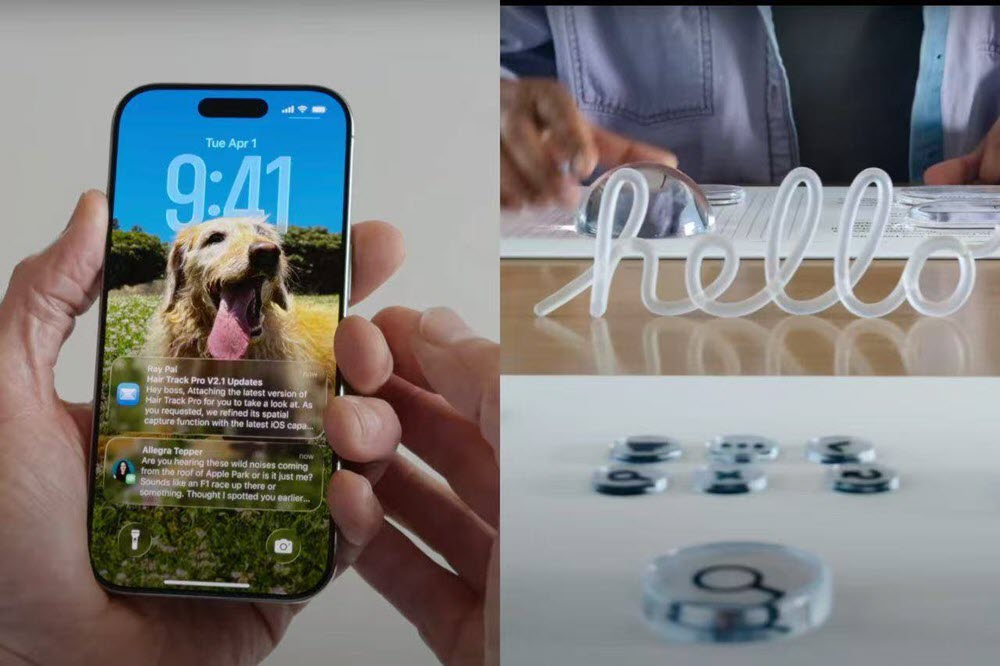
iOS 26: The Most Controversial Changes
The iPhone gets the most attention since it’s Apple’s most popular device. The biggest debate right now is about Liquid Glass design.
Early Problems with Transparency
The first beta was a disaster. The first beta had made Control Center nearly unreadable due to its glassy design, which allowed too much transparency and cluttered the interface. Text and icons were hard to read because the background showed through too much.
Beta 2 fixed some of this. The second beta improves this by making what’s underneath Control Center more opaque for easier readability at a glance.
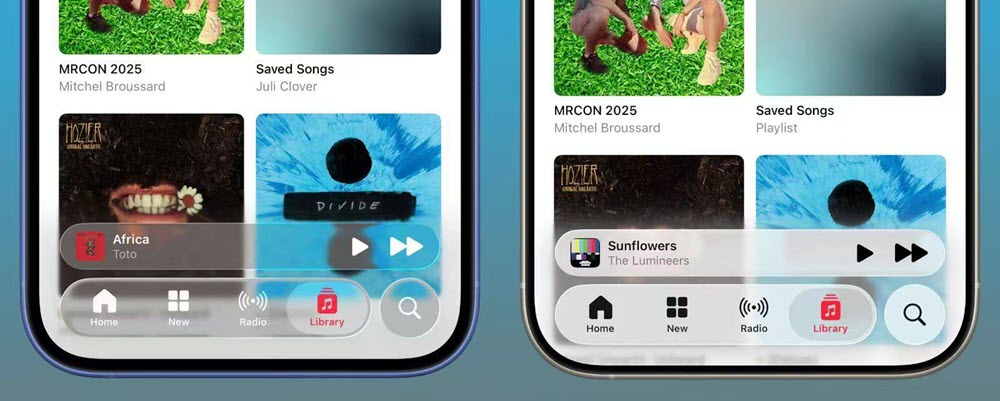
Beta 3 extends this fix to native apps like Apple Music. Navigation bars now have blur effects underneath, so content stays readable even when the background changes.
User Reactions Are Split
The changes work, but not everyone likes them. Some users think the new grayish blur looks cheap compared to the original crystal-clear “liquid glass.” The most obvious fix is that Apple could implement a more aggressive background blur to make the foreground UI elements stand out, but critics say this defeats the purpose of the transparent design.
What’s Fixed in Beta 3
After using Beta 3 for a day, here are the main improvements:
- Battery settings are now fully translated to English (some parts were still in Chinese before)
- Native keyboard prediction box looks better
- Control Center toggle colors are improved
- Dock no longer shifts when you have fewer than four apps
- AssistiveTouch screenshot bugs are fixed
- AirPods connection issues resolved
- Swiping up to go home now stays on current app instead of jumping to others
- Three new wallpapers added: Sky, Halo, and Twilight
New Problems Appeared
But new bugs showed up too. Contacts now shows scrambled avatars for people without photos instead of using their initials. Sometimes the battery icon disappears when you pull down Control Center.
Performance Gets Better
The good news is iOS 26 Beta 3 runs much smoother. Battery life and heat management improved. Frame drops happen less often. Testing on an iPhone 15 Pro with 89% battery health shows similar battery life to iOS 18.5 when using WeChat and social media apps.
This is clearly the most stable iOS 26 beta yet. The public beta should feel ready for regular users.
iPadOS 26: Finally Getting Serious About Productivity
iPadOS 26 gets much better reviews than iOS. The reason is simple iPads with M-series chips finally feel like real computers.
Apple removed the old split-screen and slide-over modes. The new window management system lets you resize, drag, and tile windows freely. This gives iPad a desktop-like multitasking experience.
Other improvements include:
- New menu bar with search and developer customization options
- Better Files app with collapsible folders and flexible list views
- macOS-style cursor highlighting shake the mouse to make it bigger and easier to find
These changes address longtime complaints about iPad not feeling like a complete computer.
macOS 26: Technical Problems Slow Things Down
macOS had the roughest update experience. Many M-series Mac users couldn’t download Beta 3 at first because of Rosetta 2 problems.
Rosetta 2 helps M-series Macs run Intel apps. Apple didn’t update Rosetta 2 alongside the beta, so Macs with Rosetta installed couldn’t check for updates.
Some users fixed this by uninstalling Rosetta 2 through Terminal, but this broke older apps. Others had to wait until Apple re-released the update later that day.
What’s New in macOS 26 Beta 3
The biggest change is Launchpad coming back. Earlier betas had removed it completely. Now it returns when you use the five-finger pinch gesture on the trackpad, but it shows a “Spotlight App Library” instead of the old grid view.
Safari tabs are easier to read now. There’s also a new Lake Tahoe screensaver showing the rocky coastline.
The Big Challenge: Making One Design Work Everywhere
After trying all the new betas, one thing is clear. Apple’s biggest challenge isn’t adding features it’s making Liquid Glass work on every device.
This is Apple’s most ambitious design project ever. They want one visual language across all devices, but it’s not easy.
Different Screens, Different Problems
On big screens like Mac and iPad, Liquid Glass looks great. The transparent layers and depth effects feel premium and sophisticated.
On iPhone, the same effects make the screen too busy. High-density information becomes hard to read when there’s too much transparency.
Performance Trade-offs
iPhones have smaller batteries and less cooling than Macs and iPads. Heavy transparency and animation effects drain battery faster and can cause lag. Larger devices handle these effects much better.
These are not likely the final adjustments, given that iOS 26 doesn’t launch publicly until the fall. However, they are indications that Apple is actively listening to early user feedback and making tweaks accordingly.
What This Means for Users
Design is subjective, but usability isn’t. Apple nailed flat design twelve years ago and it lasted over a decade. Now they face over one billion users with higher expectations.
If you’re having trouble adjusting or reading some text, temporarily activating Reduce Transparency might help ease the transition. Apple included accessibility options to tone down the transparency effects for users who need better readability.
The success of Liquid Glass will depend on finding the right balance between beauty and function, between consistency and flexibility across all Apple devices.
Apple has until fall to get this right. Based on the beta progression so far, they’re clearly listening to feedback and making changes. Whether they can satisfy both design enthusiasts and practical users remains to be seen.













Leave a Reply