You know what the tattoo should feel like. You just can’t draw it.
So you type “free AI tattoo generator” into a search bar and land on twelve listicles that all promise the same thing: describe your idea, get a beautiful design in seconds. That part is true. The part nobody mentions is what happens at the download button, and again when you sit down in the chair.
We went through six free generators and judged them on both. Two will hand you a clean file without asking you to create an account at all. A third says it will, and that claim is worth testing before you count on it. All six will produce something your artist has to redraw before it goes near your skin. None of that is a dealbreaker. Knowing them is the difference between a productive consult and an expensive surprise.
Below: which tool fits which idea, the exact prompt structure that produces flat tattooable art instead of a pretty picture of a tattoo, and what to say when you hand the file to an artist.
If you only read one thing: Perchance for unlimited free exploration with no account, Adobe Firefly for the cleanest file to bring to a studio, Canva if you want to fix the AI’s mistakes yourself instead of rerolling and hoping.
How we ranked these six free AI tattoo generators
Ranking tattoo generators by how good the images look is the easy approach, and it’s the wrong one. A painterly render with atmospheric lighting can be genuinely beautiful and completely unusable as a tattoo. So the criteria are ordered by what actually gets ink into skin:
- Free-tier reality at the point of download. Can you save a usable file without paying, without a card, and without an account? A watermarked JPEG you can’t scale or trace is not a free design, it’s an advertisement.
- Tattoo viability of the output. Flat art on a plain background, visible line-weight hierarchy, no detail below the scale a needle can reproduce, lettering that spells what you asked for. This is where most tools quietly fail.
- Style range and control. Can it do fine line, blackwork, American traditional, Japanese, dotwork? Can you constrain shading, or does it default to gradients?
- What happens to your design afterward. Whether the file is private, and who owns what.
One deliberate omission: none of these six has a dedicated stencil export or a true placement preview. That isn’t an oversight in our shortlist, it’s the state of the category. Dedicated tattoo tools sell stencil conversion and body preview as paid features; general generators don’t have them at all. Everything below is written with that gap in mind.
How this review was built. This is a documented-spec review, not a hands-on image test. Every feature, limit, and price was read from the vendor’s own product and pricing pages in October 2026. We did not run identical prompts across all six tools and score the images, so we make no claims about which one produces prettier output. Where a vendor doesn’t publish a number, we say so rather than estimate it.
Disclosure: none of these tools is ours, no tool paid for placement, and the rankings reflect the criteria above.
What “free” actually means for an AI tattoo generator
“Free” in this category means one of four things, and only one of them is useful to you. The word is doing heavy lifting on most product pages, so here is what it actually covers.
- Free with a watermark. You can generate all day. The file is stamped, which makes it useless for tracing, scaling, or stenciling.
- Free after you create an account. The generation is free; your email is the price.
- Free for a small number of generations, then a credit wall.
- Free because someone else is the product. Your design lands in a public gallery, which is fine for a dragon and less fine for a memorial piece with a name and a date on it.
Here is what each of these six actually asks for:
| Tool | Account required | Card required | What the vendor says about free output | Cheapest paid option |
| Perchance | No | No | Page is titled “free, no sign-up, no limits” | No paid tier |
| Adobe Firefly | Yes (Adobe ID) | No | “Limited free daily generations”; outputs positioned as commercially safe | $9.99/mo, 2,000 credits |
| Canva | Yes | No | “Limited free tattoo images” through Magic Media | Pro, for more generations plus Magic Edit and Magic Eraser |
| Template.net | Not to start | No | Page is titled “No Signup”; generator is free to try | $11/mo billed yearly, 1,450 credits |
| Remaker | Yes, to get credits | No | Free credits on sign-up (the page title claims no sign-up) | $5.99 one-time, 200 credits |
| Appointo | No | No | “Totally free — no logins, no watermark” | Premium generator, price not published |
Two columns decide this for most people. Watermark matters because a stamped image can’t be scaled to eight inches and traced; the lines break up when you enlarge them. Account requirement matters less for privacy than you’d think, but it does mean your generations live on someone’s server under your identity.
That Remaker row is worth reading twice. The tool’s page title advertises “No Sign-up,” while the site’s own FAQ says new users receive free credits on sign-up. One of those statements describes the product and the other describes the marketing. Test the flow yourself before you count on it, and apply the same skepticism everywhere: the landing page is a sales document, the download button is the truth.
A note on privacy, because this is where people get surprised. Tools that generate without an account don’t have a profile to publish your design to. Where an account is required, look for a visibility or private-mode setting before you generate anything personal, and check the terms for whether outputs feed a public gallery by default. For a memorial tattoo, a partner’s name, or a date, it’s worth two minutes.
The six tools at a glance
| Tool | Best for | Inputs | Named styles | Tattoo-specific tooling | Paid from |
| Perchance | Unlimited free ideation, no account | Prompt + exclusions | Presets, plus any style you name in the prompt | None | No paid tier |
| Adobe Firefly | Cleanest file for a real stencil | Prompt + reference image | Broad, including fine line, traditional, neo-traditional | None | $9.99/mo |
| Canva | Editing the design after generation | Prompt inside the editor | Broad via prompt and filters | None | Pro subscription |
| Template.net | Style breadth and starting templates | Prompt, reference image, or template | 11+ including dotwork, tribal, surrealism | None | $11/mo |
| Remaker | Prompts organized around placement | Prompt + style dropdown | 6+ including realism and dotwork | None | $5.99 one-time |
| Appointo | Classic ink styles with zero friction | Prompt + 7 styles | 7 | None | Premium tier, price not listed |
That “tattoo-specific tooling” column is the honest finding. Not one of these six will export a stencil, let you set line weight, or show the design on your arm. They generate images. The tattoo translation is still a human job, and the rest of this article is largely about making that job easier.
Use the table like this: if the idea needs a photograph as a starting point, you’re down to Template.net and Firefly. If it’s a name or a date, read the lettering warning before you generate anything. If you’re still deciding what you want at all, start with the tool that costs nothing and asks nothing.
1. Perchance AI Tattoo Generator: best for unlimited free ideation, no account
Tool: https://perchance.org/ai-tattoo-generator
The only tool here that asks for nothing at all. No account, no card, no visible cap on generations. The trade-off is consistency, not access.
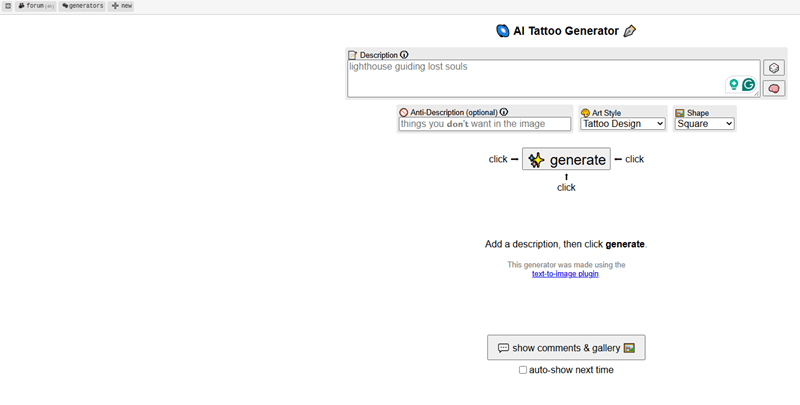
Perchance runs as a plain web page: you type a prompt, choose a style preset and an image shape, set how many outputs you want, and generate. There’s no onboarding, no upsell modal in the way, and no dashboard to learn. For someone who wants to see forty variations of an idea before deciding whether the idea is any good, that frictionless loop is the whole value.
The feature worth knowing about is the anti-description field, which lets you exclude things you don’t want. Asking for a botanical design and excluding skulls sounds trivial until you’ve watched three tools in a row put a skull in your wildflower piece. Reviewers who have used the tool describe it as one of the most useful controls in a free generator, precisely because killing unwanted motifs is half the work of art direction.
The other unusual thing is transparency. Perchance generator pages are editable and forkable, so you can see how the prompt logic is built and modify it. That’s a genuine curiosity for technical users, and it explains why the tool behaves differently from polished commercial products: it’s a community platform, not a product with a roadmap.
What it does well
Free in the literal sense, with no account, no card, and no watermark added by the tool. Iteration is fast enough that generating a dozen variations costs you a minute rather than a credit balance. The anti-description field gives you negative control that most free tools don’t offer. Style is set by the words you use, so you’re not limited to a preset menu. And because there’s no signup, there’s no profile your designs get attached to.
Where it falls short
Consistency is the price of all that freedom. Complex, multi-element prompts tend to come back as jumbled compositions, and output quality varies from run to run, a point reviewers who have used the tool raise consistently. That’s why the practical workflow is to generate three or four and pick, not to expect one perfect result. There is no tattoo tooling at all: no line-weight control, no placement preview, no stencil export. As a community-hosted generator, expect occasional slowness at peak times and no support channel if something breaks. The tool’s own “no limits” claim is the vendor’s language; site-wide throttling during heavy load is possible and outside your control.
Free tier and pricing
Entirely free. There is no paid tier to compare against, which is either the best thing about it or a warning about long-term support, depending on your appetite.
2. Adobe Firefly: best clean linework for a real stencil
Tool: https://www.adobe.com/products/firefly/features/tattoo-generator.html
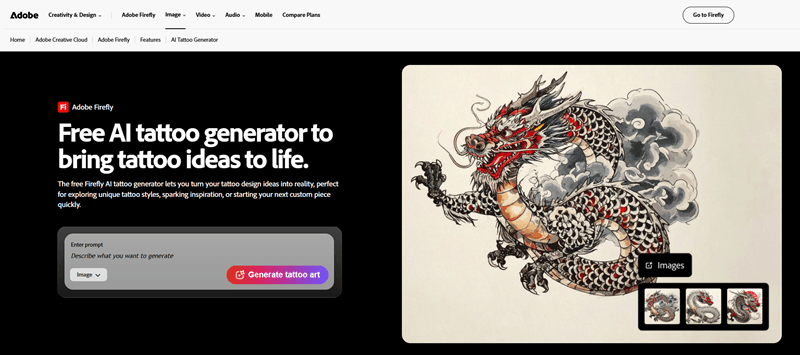
The strongest candidate for a file your artist will actually use, judged on what it’s built to do rather than on test results: reference-image input, high-resolution downloads, and output Adobe describes as clean and consistent rather than painterly. Its free tier is also a real free tier, not a three-day trial.
Firefly’s tattoo generator takes two kinds of input: a text prompt, or a reference image you upload. That second path is the practical one for the most common request in this category, which is “turn my dog into a tattoo.” You can hand it a photo, a sketch, or an existing AI image and ask it to work from that composition instead of inventing one from words.
The iteration loop matters more than any single feature. You generate, adjust the prompt, explore variations, and remix the outputs you like. Tattoo design is a convergence process: nobody lands the final image on the first roll, and the tools that make the tenth roll cheap are the ones that produce usable results. Firefly’s controls are built around that loop.
The commercial-use positioning is the other differentiator, and it deserves more than a footnote. Adobe says Firefly is trained on licensed and public-domain content and describes outputs as commercially safe. If you’re a tattoo artist building flash sheets or selling designs, that’s a material difference from a generator trained on scraped portfolios. If you’re a client who’d rather not walk around wearing something derived from an artist’s work without their knowledge, it’s a comfort, not a guarantee.
What it does well
Two input modes, including reference-image upload, which most free tools in this category skip. A prompt-to-variations-to-remix loop that supports real iteration. High-resolution downloads suitable for showing an artist or printing. Commercially safe positioning backed by licensed training data, which matters to working artists. Browser-based with an Adobe ID, so no install.
Where it falls short
It is a general image model with a tattoo landing page, not a tattoo tool. No line-weight control, no placement preview, no stencil export. The free allowance is daily and limited, which constrains exactly the generate-fifty-times workflow this task rewards; heavy users hit the ceiling fast. And like every general model, it will happily render soft gradients, atmospheric haze, and micro-detail that no needle can reproduce. An account is required.
Free tier and pricing
The free plan includes limited daily generations across standard and premium features. Firefly Standard is $9.99/month with 2,000 monthly generative credits, Pro is $19.99/month with 4,000 credits, and higher tiers scale to 50,000. Adobe’s own documentation notes that paid Firefly plans include unlimited access to standard image features without credit deduction, which is where frequent users end up.
One caution on licensing: don’t assume the commercial-safety language or any indemnification extends to the free tier. Check Adobe’s current generative AI terms for the plan you’re actually on before you rely on it for client work.
3. Canva AI Tattoo Generator: best if you want to edit the design afterward
Tool: https://www.canva.com/ai-tattoo-generator/
Not the strongest generator on this list, but the best workbench. You generate inside a full design editor, which means you can fix what the AI got wrong instead of rerolling and hoping.
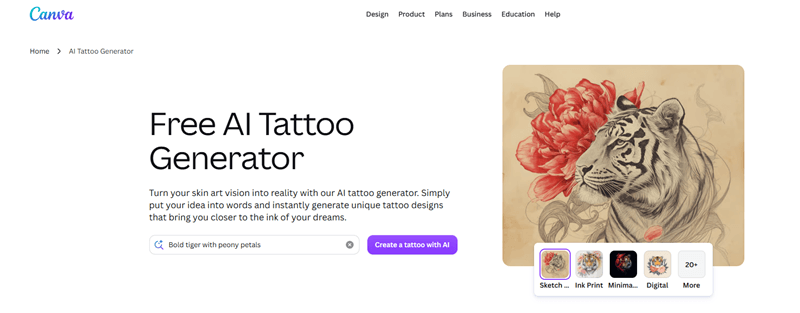
The path is less obvious than the marketing suggests. Canva doesn’t have a standalone tattoo tool; you open the editor, go to Apps, choose Magic Media (or “Create an image with Canva AI”), enter a prompt, and generate several options. Then you drag the one you want onto the canvas and work on it like any other design asset.
That last step is the entire argument for Canva. AI lettering is unreliable across every tool in this category, so being able to delete the garbled script and set your own text from a font library solves a problem the others can’t. The same applies to removing a stray element, adjusting composition, or building a flash sheet across multiple pages with consistent spacing. Pure prompt boxes give you one lever; Canva gives you a canvas.
Be clear-eyed about what it isn’t. There’s no placement preview and nothing tattoo-specific about the tooling. It has no tattoo-tuned controls for realism or for complex multi-element compositions, the two areas general design tools handle least predictably. And the features that make editing pleasant, Magic Edit and Magic Eraser, are Pro features, so the free experience is more “generate and accept” than “generate and refine.”
What it does well
A full editor immediately after generation, which is unique in this set. Surgical fixes through Magic Edit and Magic Eraser (both Pro). A large font and shape library for lettering and layout, which matters because text rendering is the weakest link in AI tattoo design. A multi-page workspace that keeps iterations organized in one file. Multiple export formats.
Where it falls short
Free generations are limited, and the genuine capability sits behind Pro. No tattoo tooling: no line weight, no placement preview, no stencil export. The app is heavy for a single-image task, and the jump from free to Pro is steep if you only want the generator.
Free tier and pricing
Canva’s own FAQ describes Magic Media as a free AI tattoo generator where you can generate “limited free tattoo images,” with Pro recommended for frequent use. The exact free allowance changes by account and region and is displayed in-app, so check yours rather than trusting a number from a third-party article. Pro pricing should be confirmed on Canva’s pricing page before you cite it anywhere.
The licensing answer is unusually candid and worth quoting: Canva states you can use Magic Media outputs for personal or commercial projects under its terms, but warns that for commercial use you may not have exclusive rights to the image, meaning others could use something similar, and that Canva doesn’t guarantee an output is safe to use if it closely resembles someone else’s work. That’s a more honest position than most competitors take, and it’s the right expectation to carry into any AI design.
4. Template.net AI Tattoo Generator: best style range and reference-image control
Tool: https://www.template.net/ai-tattoo-generator
The widest menu of tattoo styles and the most flexible set of starting points. If you already know the look you want, this is the fastest route to seeing it.
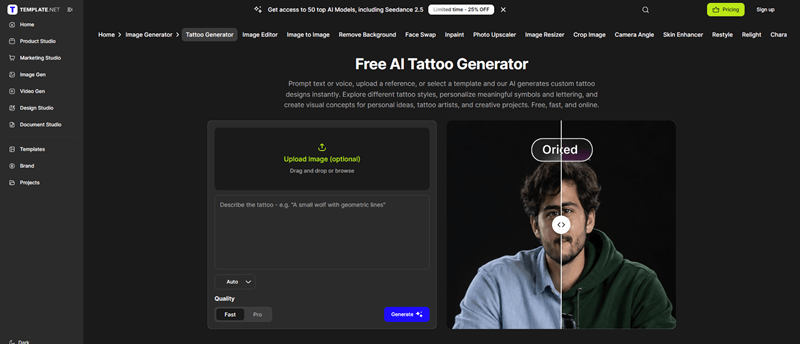
The product’s real shape is its three entry paths. You can describe a tattoo in a prompt, upload a reference image or sketch to steer the visual direction, or start from a ready-made template and modify it. Most free tools offer one or two of those; having all three means you’re never stuck translating a visual idea into words when you don’t have the vocabulary for it.
Template.net’s own example prompts are useful as models: “Create a fine-line moon and flowers tattoo with delicate botanical details,” or “Design a blackwork dragon with bold geometric elements.” Notice the structure: style word, subject, then a qualifier about detail level. That’s the formula the next section unpacks.
The named style list is longer than most: minimalist, fine line, blackwork, realism, Japanese, watercolor, traditional, neo-traditional, tribal, dotwork, surrealism, and lettering. Two smaller features punch above their weight. Aspect ratios include 1:1, 3:4, 4:3, 9:16, and 16:9, which matters more than it sounds when you’re matching a design to a long forearm rather than a square canvas. And prompt support covers 20+ languages, which is a genuine advantage if the idea involves script you don’t read fluently.
What it does well
Three input paths including templates and reference upload. Broader named-style coverage than most free options. Aspect-ratio control that helps with placement-shaped compositions. Multilingual prompting. Straightforward download and share options, including high-quality output.
Where it falls short
No tattoo-specific controls: no line weight, no placement preview, no stencil export. The free allowance isn’t clearly published on the pricing page, which lists paid tiers only, so budget for a surprise. The paid model is credit-based, which can feel opaque if you’re generating heavily. And like everything here, the output still needs an artist’s redraw.
Free tier and pricing
Free to try, with the page itself titled “No Signup.” Paid plans are credit-based and billed yearly: Starter at $11/month with 1,450 credits, Plus at $25/month with 3,300, and Max at $66/month. Multiformat exports (PNG, PDF and more) are included across tiers.
Treat the “no signup” claim the same way you’d treat any landing-page promise: test the actual flow. It’s possible to generate before creating an account while still hitting a wall at download or export.
5. Remaker AI Tattoo Generator: best for placement-aware prompting
Tool: https://remaker.ai/ai-tattoo-generator/
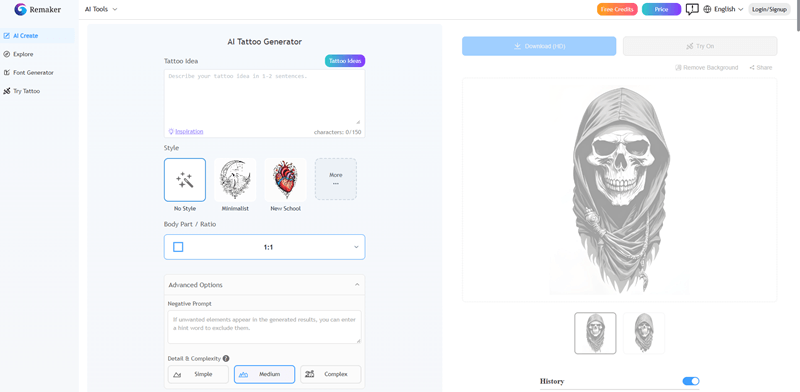
The only tool in this set whose prompting model is organized around where the tattoo goes, and it rewards specificity in the prompt field.
Remaker’s workflow is a free-text prompt plus a style dropdown. The prompt is where the difference lives: the tool explicitly asks you to specify style, elements, and placement, including body areas like arm, forearm, or thigh. That’s a small instruction with a large effect. “Wolf” and “wolf, upper arm, vertical composition” produce genuinely different images, and the second is closer to something an artist can use, because it has already made a decision about orientation and proportion.
The style dropdown covers Traditional, Realism, Minimalist, Dotwork, Japanese, and more. Below the generator, subject galleries show example outputs organized by motif: wolf, butterfly, Medusa, rose, dragon, lion, lotus, and dozens of others. Browse those before you spend credits. Ten minutes in the gallery teaches you what the model is good at faster than ten prompts will.
What it does well
Placement-first prompting that produces compositionally useful results. A broad style dropdown. Subject galleries that double as a style reference for people who don’t know the vocabulary yet. A refine-and-regenerate loop that’s quick enough for iteration. Particularly useful if you’re choosing between placements rather than between designs.
Where it falls short
No tattoo-specific tooling. Its featured gallery skews toward illustration rather than stencil-ready line art, which usually means more work for your artist. Credit costs accumulate quickly during heavy iteration, and the free allowance is small enough that you’ll notice.
Free tier and pricing
Remaker gives new users free credits on sign-up plus a small recurring daily allowance, according to the site’s own FAQ, with paid credits sold as one-time packs rather than a subscription: $5.99 for 200 credits, up to $299 for 20,000. One-time purchase is a genuine advantage over subscriptions if this is a one-project need, and there’s nothing to cancel afterward.
Note the contradiction: the tool’s page title advertises “No Sign-up,” while the FAQ describes credits granted at sign-up. Verify which is true before you plan around it.
6. Appointo AI Tattoo Generator: best free pick for classic styles
Tool: https://www.appointo.me/tools/ai-tattoo-generator
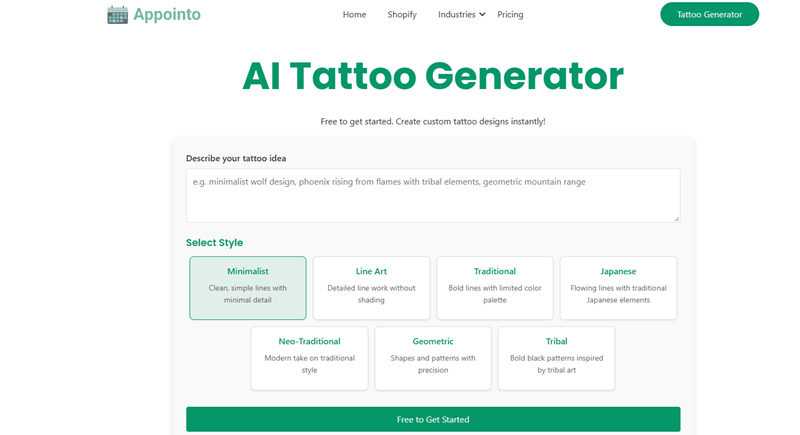
The least complicated tool here. Seven styles, a prompt box, and a black-and-white line drawing at the other end. For traditional, tribal, or geometric work, that restraint is the point.
The seven styles are Minimalist, Line Art, Traditional, Japanese, Neo-Traditional, Geometric, and Tribal. That list tells you exactly who this is for. There’s no watercolor, no realism, no color handling, which is a limitation if you want a photorealistic portrait and a feature if you want something a needle can actually execute. High-contrast ink styles are where the tool is tuned.
Appointo’s page describes the output as a black-and-white concept in “crisp, high-contrast, ink-style line art,” downloadable as a high-resolution PNG. That output shape is more useful for a stencil than a painterly render, because an artist converting a design to a stencil needs flat art with defined edges, not atmosphere and soft transitions. It also states the tool is free with no logins and no watermark, which is a rare combination in this set.
The honest framing: this is a side project from a company that makes appointment-scheduling software, sitting alongside its coloring-page and story generators. That’s fine for what it does, and it means you should expect no roadmap, no support, and no promises.
What it does well
Seven ink-first styles that cover the classics properly. A simple flow: type the idea, choose a style, generate, download. Flat black-and-white line output that’s closer to stencil-ready than a typical render. Free with no login and no watermark, per the tool’s own page. High-resolution PNG download. Works on mobile and desktop.
Where it falls short
Narrow style range, with no watercolor, no realism, and no color. No reference-image upload documented on the page. No placement preview. No stencil export. Limited product support given the company’s focus elsewhere.
Free tier and pricing
Free, with the stated no-login and no-watermark conditions. A premium generator is offered with higher resolution and more detailed customization, but no price is published on the tool page, so treat the paid tier as unknown until you click through.
Why most AI tattoo designs don’t work on skin
This is the part that decides whether any of the above was worth your time.
The mismatch isn’t stylistic. Image models are optimized for screens, where subtle gradients, atmospheric lighting, and thousand-line texture read as quality. Tattoos exist on living skin, where those same qualities collapse into a grey smear. The step between the two is what a tattoo artist does, and it isn’t cosmetic.
Here’s what goes wrong, in roughly the order working tattoo artists report noticing it when a client brings in an AI reference.
Detail the machine can’t reproduce. Individual hairs, hair-thin shading transitions, dust particles, the fine texture on a feather. Skin can’t hold that resolution. When detail sits too close together, it merges as the tattoo heals and continues to spread over the following years. Artists describe having to make hundreds of decisions about what to simplify, and clients often read the simplified result as “it doesn’t match my reference.”
Gradients instead of tone. A tattoo reads in a handful of distinct tonal steps, which is why black-and-grey work is built from deliberate values rather than smooth airbrush transitions. Models produce 256 levels of grey because that’s what a photograph has. The result looks sophisticated on screen and turns to mud on an arm.
No line hierarchy. In a good tattoo, the outline is heavier than the interior detail. That’s what makes the design readable from across a room. AI output often gives every line the same weight, so nothing reads as the silhouette.
Anatomy and logic errors. Extra fingers, a paw with the wrong number of toes, a snake whose body doesn’t connect, petals growing out of nowhere. These hide in a busy image and become obvious the moment someone traces the linework.
Lettering. Text rendering remains a weak point across image models. Misspelled words, invented glyphs, and mirrored characters are common, and unlike a typo on a website, this one is permanent.
Wrong geometry for the placement. A square composition for a tapering forearm. A design that needed to wrap around a limb, drawn flat. Skin curves and moves; a flat image doesn’t account for either.
Before you take anything to a shop, run these four checks on the file:
- Is it flat art on a plain background? If it’s a tattoo rendered on a photographed arm, it’s a mockup, not a design. You need the flat version.
- Is there a visible difference between outline and detail lines? If everything is one weight, the design won’t read at distance.
- Does the silhouette still work at thumbnail size? Shrink it. If the shape dissolves, it’ll dissolve on skin too.
- Can you read every letter out loud, character by character? If there’s any doubt, the lettering is wrong.
This is also where the category’s biggest gap shows up. None of these six tools has a stencil-export mode, and no design should be treated as a validated stencil source. What you’re producing is a reference: something that shows an artist the subject, mood, composition, and style you want. That’s genuinely valuable, because those are the parts that are hardest to explain in words. It just isn’t the final drawing.
How to write a prompt that produces something tattooable
Most bad AI tattoo results aren’t a model problem. A tattoo design generator follows your prompt more literally than you expect, which means the sentence you type matters more than the tool you type it into. And the fix is a fixed structure.
The formula: [style] + [subject] + [composition or placement] + “white background” + [constraints]
A weak prompt and its improved version, side by side:
Weak: snake tattoo
Better: fine line snake tattoo coiled around a dagger, thin black linework, vertical composition for the forearm, white background, no shading, no text
Three moves carry most of the improvement.
Name the style first. The style word controls line weight and shading more than anything else you can type. Fine line, blackwork, dotwork, American traditional, neo-traditional, irezumi, black and grey realism, watercolor, ornamental. Pick one and put it at the front.
Demand a white background. This is the most common omission and the most expensive one. Without it, models render a tattoo on a photographed arm, complete with skin texture and ambient light, which looks impressive and is useless when you need flat art to trace.
Constrain the shading. “Solid black only,” “no gradients,” “dotwork only,” “no painterly texture.” These words fix the exact failure mode described in the previous section, and models respond to them.
Then apply one discipline: change one variable at a time. Diffusion models produce a different composition on every run, so the second or third generation of the same prompt is usually the keeper. Rewriting the whole prompt after one disappointing result throws away the information you just paid for.
Six prompts that work well with the tools above, ready to adapt:
- Fine line botanical:
fine line botanical tattoo, wildflowers and thin stems, delicate black linework, white background, no shading - Blackwork geometric:
blackwork geometric tattoo, interlocking triangles with dot shading, solid black, strong silhouette, white background - American traditional:
American traditional tattoo of a swallow, bold black outlines, red and teal fill, flat color, white background - Japanese sleeve:
Japanese irezumi tattoo, koi fish and waves, bold outlines with grey wash, vertical composition for a forearm, white background - Minimalist:
minimalist tattoo, single continuous line mountain range with a crescent moon, thin black ink, white background - Black and grey:
black and grey realism tattoo of a wolf head, smooth shading in four tones, no hard outline, white background
For lettering, don’t fight the model. Generate the design without text, then set the type yourself in an editor like Canva, or have your artist draw it. A name in the wrong font is a year of regret; a name hand-lettered by the person tattooing it is usually better than what any generator would have produced.
The two things prompting can’t fix are lettering accuracy and anatomy. Both need human eyes, and both are the first things an experienced artist checks.
How to bring an AI design to your tattoo artist
Yes, most artists will work from an AI reference. Almost none will tattoo it exactly as generated, and that’s not a rejection of your idea.
Redrawing is what artists have always done with client references, whether it was a napkin sketch, a photo of someone else’s tattoo, or a painting in a museum. The reasons are structural. Size sets detail: a concept that works at eight inches loses most of its information at three. Skin is curved and moves, so a flat composition has to be rebalanced to flow with muscle rather than sit on it like a sticker. And the design has to become a stencil, printed or traced onto transfer paper, which requires clean, bold, simplified lines. Faint or fussy markings don’t transfer well.
Some artists decline AI references entirely, and studios set their own policies; more than one shop has published its position that AI is useful for inspiration and unsuitable as a final design. Ask when you book rather than at the chair.
Bring four things:
- One hero design. The version you actually want.
- Two alternates. Different framing or a variation on the same idea, so the artist can see what you liked.
- A simplified or line-art version. It shows you understand the translation problem and gives them a head start.
- Notes. Placement, size in inches, black or color, and the two or three elements you refuse to lose.
Then say this, or something close to it:
“I know this was AI-generated, so it’ll need adjusting. Feel free to redraw it for placement and line weight. The parts I care about are the crescent moon and the scale of the flowers.”
That last sentence does the real work. It tells the artist which decisions are yours and which are theirs, which is the difference between a collaboration and an argument. Expect to pay for custom design time; the redraw is skilled labor, and it’s the part that turns an image into something that will still look right in ten years.
Safety, copyright, and privacy: what to check before you commit
Three questions come up every time, and none of them is about which generator makes prettier pictures.
Who owns an AI-generated tattoo design?
In the US, copyright requires human authorship. A purely machine-generated image generally isn’t protectable, which cuts both ways: you can use the design, but you may not be able to stop someone else from using something similar. Canva says as much in its own FAQ, warning that commercial use of an AI output may not come with exclusive rights.
The useful corollary: when your artist substantially redraws the design, the resulting custom artwork is theirs, and that’s normal. You’re paying for a drawing as well as a tattoo. This is general information, not legal advice; if the design has real commercial value to you, talk to a lawyer.
Is the design itself a safety issue?
No, and this is worth being blunt about. An AI generator cannot make a tattoo unsafe. Ink and technique can.
Tattoo inks and pigments fall under FDA oversight as cosmetics, and the agency is explicit that it has not approved any pigments for injection into the skin. Many pigments used in inks aren’t approved for skin contact at all; some are industrial-grade colors suitable for printers’ ink or automotive paint. The FDA has received reports of infections from contaminated inks and allergic reactions to the inks themselves, including from sealed containers, because sterility claims on a label aren’t a guarantee.
For context, not alarm: FDA figures suggest about 30% of Americans and 40% of people aged 18 to 34 have at least one tattoo. The relevant takeaway isn’t that tattoos are dangerous. It’s that the design file is the least risky part of the process, and choosing a licensed studio with a hygiene record matters more than which generator you used.
Where does your design end up?
This is the question almost nobody asks and everybody should.
Some free tiers in this category publish generated designs to a public gallery by default, which is fine for a dragon and not fine for a memorial piece with a name and a date. Before you generate anything personal, check the account settings for a visibility toggle or private mode, and read the terms for what happens to your outputs. Tools that require no account at all sidestep the issue entirely, which is one more argument for starting there.
Frequently asked questions
Is a free AI tattoo generator good enough for a real tattoo?
Yes as a starting point, no as a final design. Free tiers are perfectly adequate for narrowing down direction, composition, and style. The file still needs an artist to redraw it for line weight, scale, and placement before it becomes a tattoo.
Can I use an AI tattoo design without an artist?
You can, and it usually goes badly. The design is the part a generator can do. Transferring it, sizing it to your body, setting line weights that survive healing, and choosing placement that flows with muscle are the parts that make it last.
Which free AI tattoo generator has no watermark?
Appointo states on its page that it’s free with no login and no watermark. Perchance requires no account at all, which removes the most common reason a free file comes back stamped. Watermark policies aren’t contractual and change without notice, so check the file you actually downloaded rather than the landing page.
Can an AI tattoo generator create lettering for names and dates?
It will try, and it will often fail. Text rendering is the weakest capability across image models: misspellings, invented glyphs, and mirrored characters are common. Generate the design without text and set the lettering yourself in an editor, or let your artist draw it.
Do AI tattoo generators work for cover-ups?
Poorly. Cover-up design depends on what’s underneath: the existing ink’s darkness, color, and density determine what can be masked. A generator has no idea what it’s covering, so treat any cover-up output as a mood reference and let an artist design the actual piece.
Is my AI-generated tattoo design private?
Not always. Some free tiers publish outputs to a public gallery by default, and account-based tools store your generations under your profile. Check visibility settings before you generate anything personal, and prefer tools that don’t require an account for sensitive ideas.
The verdict: which free AI tattoo generator should you use?
Match the tool to the situation rather than looking for one winner.
- You want to explore forty ideas tonight, free, without an account: Perchance. Nothing else in this set is this frictionless.
- You want the cleanest file to hand your artist: Adobe Firefly. High-resolution downloads, commercially safe positioning, and a reference-image upload that handles “turn my photo into a tattoo” properly.
- You already live in Canva and want to fix the AI’s mistakes: Canva Magic Media. The editor is the value; the generator is the entry point.
- You have a reference photo and a fixed style: Template.net. Three ways in, and the broadest named-style list here.
- You know where it’s going on your body: Remaker. Its prompting is built around placement, so the composition arrives shaped for a body area rather than for a square canvas.
- You want traditional, tribal, or geometric line art with zero friction: Appointo. Seven styles, no login, no watermark, flat ink output.
The workflow that actually works is two tools, not one. Generate wide in whichever tool is cheapest and freest for you, then take your three favorites into the one with the best linework and refine from there. Then budget for the redraw, because that’s the step where an image becomes a tattoo. None of these six tools replaces it, and the ones that claim to are selling you something.
Other free options worth knowing
Most competing roundups lead with BlackInk AI, Ink Studio AI, TattoosAI, and INK, and readers who’ve done their homework will notice their absence here. They’re worth knowing about; they simply didn’t fit this article’s criteria.
TattoosAI is the most straightforward example of the pattern: its own site describes a free allowance of four generations, one full set of designs, before you move to a paid plan. The others follow a similar shape, leading with a subscription and a small trial allowance rather than a genuinely open free tier. Several of them also sell stencil conversion and body preview as paid features, which makes them better tools for some jobs and worse fits for a “free” search.
If your priority is stencil conversion or a preview on your own skin, those dedicated products are the right place to look. If what you want is a free tattoo generator you can open, use, and close without an account or a card, the six above are the better starting point.












Leave a Reply