I recently got my hands on Nano Banana, an intriguing new AI image tool, and put it through its paces. In this review, I’ll share my firsthand experience testing its standout features from its excellent consistency and text-to-image editing to its astonishing blending capabilities. I’ll also explore its practical applications and see what other users are saying. Curious to see if it lives up to the hype? Let’s dive into my full review.
What is Nano Banana?
So, what exactly is Nano Banana? Well, from what I can tell, it’s not some weird fruit hybrid! It’s actually the catchy internal codename for a super-powerful image model from the folks at Google’s DeepMind. I’ve been playing with it through Gemini, and the core idea is simple: you can take an image and make a bunch of changes to it just by typing what you want.
I’m talking about changing outfits, altering poses, blending pictures together, or even colorizing old photos, all while keeping the main subject looking like themselves across every edit. It’s been popping up on techie demo sites under the “nano-banana” name, which is how I first heard about it. Now that it’s part of Google’s AI Studio and Gemini apps, it seems like everyone is starting to test it out, and I knew I had to try it for myself.
People Also Read:
- FlixHQ Review: Online Stream Movies and TV Shows for Free
- GPT-5: All You Want to Know is Here
- Best Free AI Chatbots in 2025 for Business/Work/Role Play
- [100% Free] 9 Best AI Humanizer Free Tools in 2025
Sparking Features of Nano Banana
After using it myself, I can see why people are excited. It’s packed with some seriously smart features of Nano Banana that just work. Here’s a closer look at what stood out to me.
Excellent Consistency for Targeted Transforms
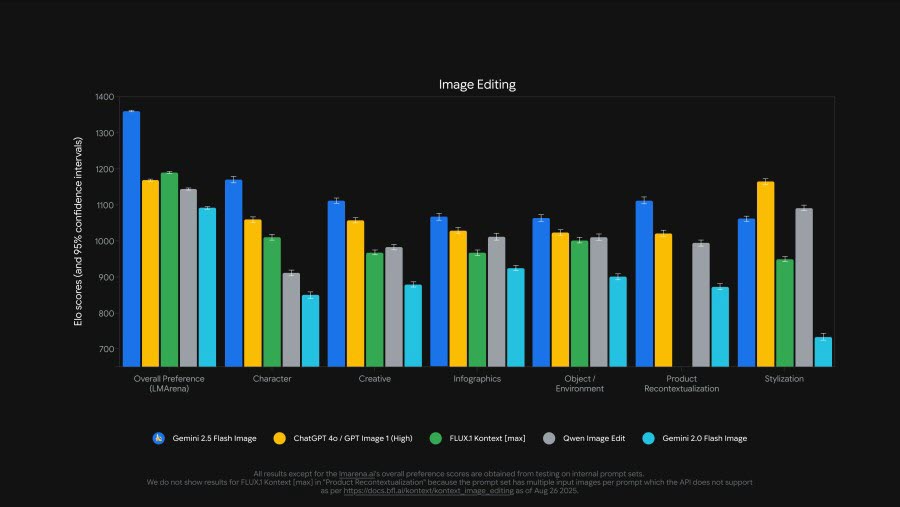
Honestly, this is the feature that blew me away. With a lot of other AI tools, you ask it to change something, and by the second or third edit, the person in the photo looks completely different, like a strange cousin, not the original subject. But Nano Banana is different. I tried it myself: I asked it to change someone’s jacket, then their pose, and then the background. Through every single change, the person’s face, their unique features, stayed perfectly consistent. It just remembers the details. I read that this is a big technical focus for Google, and it shows. For anyone who needs to create multiple versions of the same character or product, this reliability is a total game-changer. It saves so much time you’d normally spend fixing mistakes.
Wonderful Text-to-Image Editing Capabilities
This tool finally let me edit pictures just by describing what I wanted. Instead of fiddling with complex software, I could just type something like, “make her dress blue and add a sunset in the background.” And it actually worked. It’s not perfect every single time, you have to be somewhat clear in your instruction,s but it’s incredible for quickly testing out ideas. I found myself brainstorming crazy prompts just to see what it would do. It feels less like using a computer program and more like collaborating with a very fast, talented designer who takes your suggestions. It really shifts the focus from technical skills to pure creativity.
Perfect Colorization and Restoration
I tested this by uploading an old, grainy black-and-white photo of my grandparents. I was prepared for it to look fake or painted-on, which is what usually happens. But I was genuinely astonished. The colors it added looked natural, skin tones were believable, the fabric of my grandfather’s suit had a realistic texture, and it didn’t just smear color everywhere. It intelligently inferred what things should look like. It’s also great at fixing damaged photos, smoothing out cracks and tears while keeping the original feeling of the image. It’s not a miracle worker for extremely damaged pictures, but for most old photos, it does an impressive job of bringing them back to life.
Astonishing Multi-Image Blending
This might be the coolest party trick. I uploaded a few different photos: one of a friend, another of a fancy hotel lobby, and a third of a dog. I asked Nano Banana to blend them all into one realistic image, placing my friend and the dog naturally into the lobby. The result was mind-blowing. It didn’t just paste them in; it adjusted the lighting so the shadows matched, scaled everything correctly, and made it look like they were all there at the same time. It’s not just for fun, though. I can see filmmakers or marketers using this to mock up scenes or ad concepts in minutes instead of spending a fortune on a photoshoot. It’s a huge time-saver for visual storytelling.
Great Fit for Different Markets
After playing with it, it’s easy to see how different industries would love this. Online stores could use it to quickly show a product in different colors without a new photoshoot every time. Game developers could keep their character designs consistent across different art. Archivists could restore historical photos. I’ve even seen it used for fun, personal projects like creating custom birthday card images. While big companies will probably use it for serious work, the fact that it’s accessible in tools like Gemini means anyone can start experimenting with it. Its real power is in making professional-grade editing fast and available to more people.
10 Applications to Use Nano Banana
Here are ten ways I personally used Nano Banana that completely blew my mind. It’s way more than just changing outfits or backgrounds!
1. Turn Anything into a Collectible Figurine
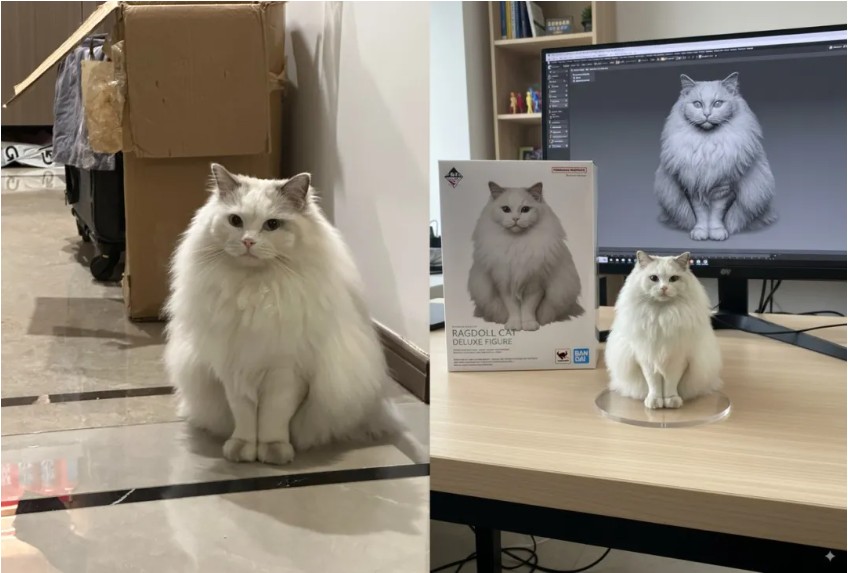
This went viral for a reason. I uploaded a picture of my cat and used the prompt to turn her into a realistic 1/7 scale figurine, complete with a transparent base and even a Bandai-style box in the background. The detail was insane it even captured the little dirt marks on her paws. It’s fun, creative, and surprisingly lifelike.
2. Instantly Create Cosplay Portraits
I’m no cosplayer, but I gave it a shot. I provided a photo of myself and one of a game character, and Nano Banana dressed me up with stunning accuracy. The outfit, props, and makeup matched almost perfectly. It wasn’t 100% identical, but the texture and overall look were so convincing I almost believed I was really in costume!
3. Change Poses with Simple Prompts
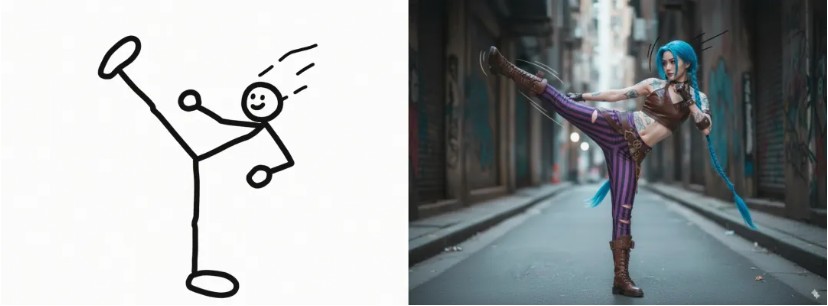
I tried this with a character image just asked Nano Banana to make her mimic a pose from another photo. It understood perfectly, even when I used a rough sketch as reference. It’s a dream for artists who struggle with anatomy or just want to quickly experiment with dynamic poses without redrawing everything.
4. Generate Exploded Product Views
As someone who loves tech and design, I was amazed by this. I prompted it to create an exploded view of a camera, and it rendered all the internal parts lenses, circuits, screws floating mid-air with perfect alignment. It looks like a professional industrial design shot. You could even animate it frame by frame.

5. Colorize Line Art with Ease
I’m not great at coloring, so this was a game-changer. I gave Nano Banana a line art sketch and a reference image for colors, and it filled everything in smoothly. It didn’t follow the palette exactly, but the mood and tone were spot-on. It’s perfect for comic artists and illustrators who want to speed up their workflow.
6. Design Game UI Concepts
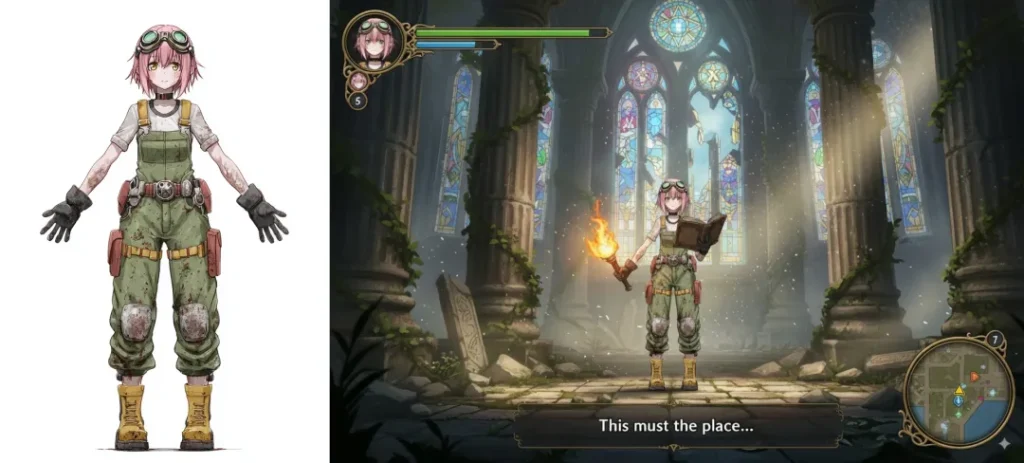
I tried generating a fantasy game screen with a full RPG interface health bars, dialogue boxes, even a minimap. The scene looked immersive and cohesive, though the text was gibberish (writing isn’t its strength). Still, for visual mockups and vibe-setting, it’s incredibly useful for indie developers and concept artists.
7. Make Comic Storyboards
I uploaded a single image and asked Nano Banana to turn it into a 3×3 comic grid. It generated different angles and moments that actually told a story. Some panels had small flaws, but the flow and composition were strong. It’s ideal for writers and artists who want to visualize narratives quickly.
8. Adjust Lighting and Atmosphere
I tested this on a portrait I asked for “half-light, half-dark” lighting to create a dramatic effect. The result looked like something from a movie. I also tried adding a sunset sky with flying birds to a landscape photo, and it blended so naturally. It’s like having a professional lighting artist at your fingertips.
9. Create Product Shots and Ads
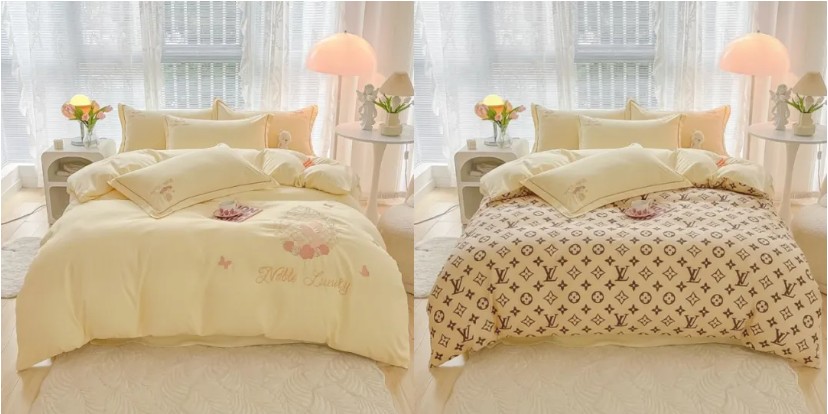
I took a plain quilt and printed an LV-style pattern on it using a simple prompt. Suddenly, it looked expensive! I also generated a lipstick ad with a model holding the product naturally. For e-commerce sellers or content creators, this is a quick and cheap way to create appealing product visuals.
10. Visual Reasoning and AR Mockups
This one felt like magic. I uploaded a photo of a landmark and asked Nano Banana to turn it into an AR experience. It highlighted the structure and added floating info labels realistically. It’s not just editing it’s understanding the image and enhancing it with interactive layers. Perfect for designers thinking in AR.
User Reviews for Nano Banano
Here are three user-style reviews based on that Reddit thread written as concise, realistic reviews that reflect the commenters’ viewpoints and tone.
- Practical pro “Great tool, but don’t believe the hype” Nano Banana is genuinely strong for specific tasks (e.g., changing clothes/styles) and competes with top editors, but it’s not a Photoshop killer. Output quality and consistency still suffer (weird artifacts, degraded textures), and about half my attempts returned the original image unchanged extremely frustrating for professional workflows. Worth trying, but expect to do final human touch-ups.
- Frustrated power-user “Scattershot and infuriating” The model is wildly inconsistent: it utterly failed on a very simple edit (changing eye positions) despite hours of retries, yet it occasionally one-shots complex style+pose+background combos. That unpredictability made me abandon the tool for some tasks and just do the edit myself which actually improved my own skills.
- Everyday user “Revolutionary for non-professionals” For people who’ve never used Photoshop, Nano Banana is a game-changer: minor artifacts or texture issues don’t matter to casual users who just want quick, easy edits from text. The main legit bug is the high failure/no-op rate, but overall it opens powerful capabilities to a huge underserved audience.
Conclusion
After spending time testing Nano Banana myself, I’m genuinely impressed. It’s not perfect sometimes it gives weird results or even does nothing at all but when it works, it feels like magic. Being able to change outfits, adjust lighting, restore old photos, or blend images just using simple words is a game-changer, especially for someone like me who isn’t a professional designer.
I can see how both casual users and professionals could benefit from it. Sure, it might not replace Photoshop for fine detail work yet, but it opens up creative possibilities that were once limited to people with advanced editing skills. The consistency it maintains across edits is remarkable, and features like image blending and character posing show real innovation.
That said, the inconsistency can be frustrating. You need patience and a willingness to experiment. But overall, I think Nano Banana is a big step toward making powerful image editing accessible to everyone. I’ll definitely keep using it and having fun along the way.











Leave a Reply